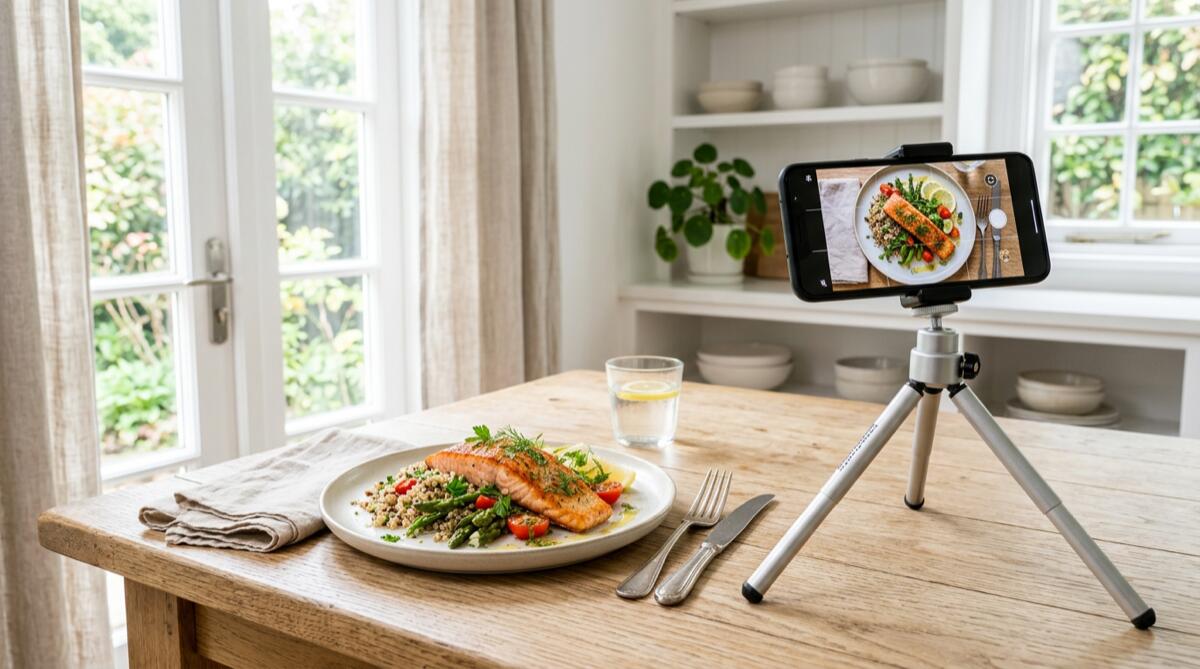
We've all been there: you've just prepared a delicious, perfectly plated meal, but before you can take your first bite, you have to spend five minutes manually searching for every single ingredient in your calorie tracking app. It's tedious, frustrating, and often leads to diet burnout. Enter the era of artificial intelligence. With modern apps like MacroLog, you can simply snap a picture of your food, and the AI does the heavy lifting for you.
However, while artificial intelligence is incredibly smart, it still relies on the visual data you provide. If you feed it a blurry, dimly lit photo taken from a bizarre angle, even the most advanced algorithms might struggle to tell the difference between a bowl of oatmeal and mashed potatoes. To get the most accurate macro and calorie estimates, you need to know how to work with the technology.
In this comprehensive guide, we'll dive deep into the best AI meal photo tips to ensure your food recognition results are as accurate as possible. Whether you're tracking for weight loss, muscle gain, or simply maintaining a healthy lifestyle, mastering the art of the meal snap will save you time and keep you on track.
The Evolution of Calorie Tracking: Why Visual AI is a Game Changer
For decades, calorie counting meant carrying around a little notebook or relying on clunky desktop software. Even as smartphones emerged, users were forced to type in "medium apple" or "chicken breast, grilled, 150g" manually. This high-friction process is a primary reason why many people give up on their diets within the first few weeks.
If you've ever wondered why your calorie count is wrong (and how to fix it), manual entry errors are usually the main culprit. Estimating portion sizes by eye without a reference, forgetting to log cooking oils, or simply getting tired of logging altogether leads to massive discrepancies in your daily energy balance.
Visual AI changes the paradigm. By analyzing the pixels, colors, textures, and spatial relationships in a photograph, AI can identify multiple foods on a single plate simultaneously. When paired with a robust database, an app like MacroLog can recognize your meal, estimate the volume, and calculate the macros in seconds. This drastically reduces friction, making it easier to learn how to track calories without becoming obsessive.
Top AI Meal Photo Tips for Flawless Recognition
To help the AI help you, here are the most effective strategies for photographing your meals.
1. Let There Be Light (Natural is Best)
Cameras and AI algorithms crave light. Dim, yellow, or heavily shadowed lighting obscures the texture and color of your food. For instance, in poor lighting, a piece of grilled salmon might look identical to a piece of grilled chicken.
- Seek natural light: Whenever possible, take your photo near a window.
- Avoid harsh shadows: Don't block the light source with your phone or your body.
- Turn on the flash as a last resort: If you're in a dark restaurant, use your phone's flash, but be aware that it can sometimes wash out the colors of lighter foods like rice or pasta.
2. The Perfect Angle: 45 Degrees
While top-down "flat lay" photos look great on Instagram, they aren't always the best for AI food recognition. A strict top-down view eliminates depth, making it incredibly difficult for the AI to estimate the volume and portion size of your food. A flat pancake and a towering burger can look surprisingly similar from directly above if the perspective is skewed.
Instead, aim for a 45-degree angle. This is roughly the angle from which you naturally view your food while sitting at a table. It allows the AI to see the height, width, and depth of the items on your plate, leading to much more accurate portion estimations.
3. Deconstruct the Complexity
AI is smart, but it doesn't have X-ray vision. If you have a massive burrito wrapped in a thick tortilla, the AI will recognize the tortilla, but it won't know if it's filled with grilled chicken and veggies or deep-fried pork and extra cheese.
When eating complex, layered, or wrapped foods, give the AI a peek inside:
- Cut it in half: Slice your sandwich, burger, or wrap down the middle and expose the cross-section to the camera.
- Spread it out: If you're eating a dense salad, make sure the toppings (nuts, cheese, proteins) aren't completely buried under a mountain of lettuce.
- Separate items slightly: If your mashed potatoes are completely covering your steak, nudge them apart so the AI can clearly identify both distinct items.
4. Provide Scale and Context
How does an AI know if it's looking at a tiny appetizer plate or a massive dinner platter? Context. While advanced apps like MacroLog use sophisticated depth-sensing algorithms, providing visual cues helps immensely.
Include standard-sized objects in the frame, such as a fork, a knife, or a standard water glass. This gives the algorithm a real-world reference point to accurately gauge the volume of your food, which is crucial for calculating your Total Daily Energy Expenditure (TDEE) accurately.
Dealing with "Hidden" Calories
One of the biggest challenges in any diet is accounting for hidden calories—namely, fats, oils, and liquid dressings. A tablespoon of olive oil contains about 120 calories, and it's practically invisible once tossed into a salad or absorbed by roasted vegetables.
When applying these AI meal photo tips, remember that you might need to give the AI a slight nudge for invisible items. MacroLog offers a brilliant solution for this: Voice Logging. You can snap a photo of your salad and simply say, "Add two tablespoons of olive oil vinaigrette." The app will combine the visual data of the veggies with your verbal input for the dressing, ensuring your macros are perfectly balanced. If you're unsure about your fat intake, check out our guide on how much fat you should eat per day.
The Science Behind Visual Portion Estimation
You might wonder how accurate photo tracking can really be. According to recent studies on digital nutrition tracking, AI-assisted portion estimation is rapidly approaching, and in some cases surpassing, human estimation capabilities. Humans are notoriously bad at eyeballing portion sizes—we suffer from "portion distortion," where larger plates make standard food portions look smaller.
By relying on an AI calorie tracker, you remove human bias. The algorithm uses thousands of data points from similar images to calculate volume. This aligns perfectly with a science-based approach to calorie tracking for weight loss, where consistency and accuracy are the keys to long-term success.
When NOT to Use Photo Recognition
While taking a photo is magical, there are times when other methods are more efficient. If you are eating a packaged protein bar, a can of soup, or a bag of chips, taking a photo of the wrapper isn't the best approach.
For packaged goods, always use the Barcode Scanner feature in MacroLog. Scanning the barcode pulls the exact nutritional data directly from the manufacturer's database, ensuring 100% accuracy for that specific brand and flavor. Knowing how to count macros effectively means knowing which tool to use for the job: photos for whole, plated meals, and barcode scans for packaged items.
Common Mistakes to Avoid
To summarize, if you want your AI to work flawlessly, avoid these common pitfalls:
- The "Motion Blur" Snap: Taking a photo while walking or moving your hand quickly. Keep the camera steady!
- The "Too Close" Crop: Zooming in so far that the edges of the plate aren't visible. The AI needs to see the whole context.
- The "Aftermath" Photo: Taking a picture when you've already eaten half the meal. Always snap before you dig in!
- The Cluttered Background: Having keys, wallets, mail, and other non-food items scattered around the plate. Keep the frame focused on the food.
Conclusion: Smarter Tracking for Better Results
Transitioning to an AI-powered calorie tracker is one of the best decisions you can make for your health journey. It removes the friction, saves you time, and keeps you accountable without the headache of manual data entry. By implementing these simple AI meal photo tips—optimizing your lighting, finding the right angle, and exposing hidden ingredients—you empower the algorithm to give you the most accurate nutritional data possible.
Ready to revolutionize the way you track your food? Stop typing and start snapping. Download MacroLog today and experience the future of effortless calorie and macro tracking with state-of-the-art photo recognition, voice logging, and barcode scanning.


